Feature Flags That Survive Reality

A Mobile Safe-Rollout Playbook
Feature flags are usually pitched as "turn features on and off." That's the junior version.
The senior version: Feature flags are an operational safety system. They let you ship changes gradually, observe impact, and recover quickly when reality wins.
On mobile, this matters more because you can't instantly roll back an app store release, users stay on old versions for weeks, and local state (caches, offline queues) makes failures sticky. A bug can persist even after you fix the code—because the app's local state is already corrupted.
That's why teams that ship reliably treat flags as control-plane infrastructure, not as a product gimmick.
This article is a practical playbook for using flags to ship safely—plus a concrete operational pattern: a remotely-triggered cache wipe that can unbrick users and eliminate poisoned persistence state.
Types of Flags That Matter
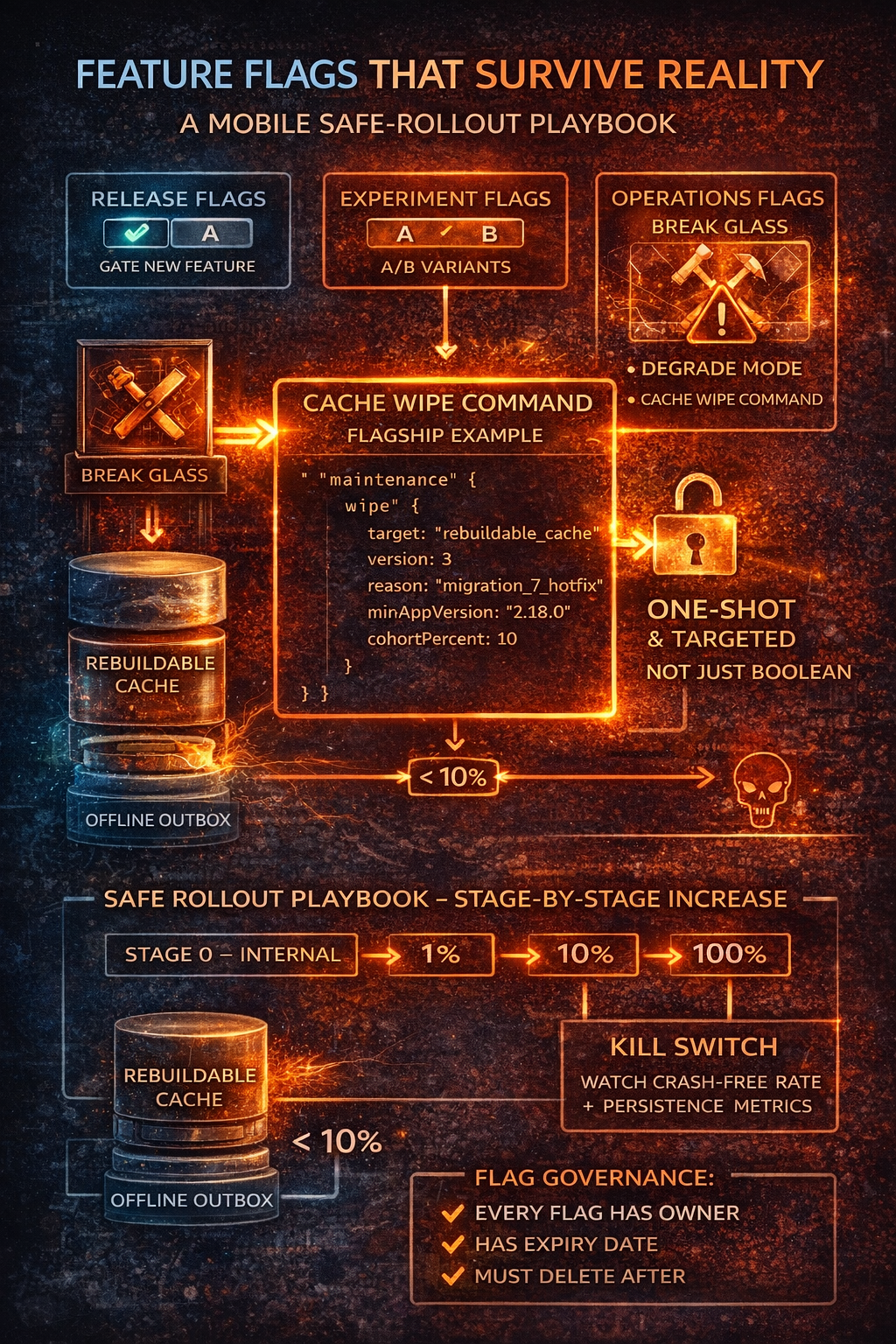
Release flags (feature gating)
"Enable new search UI for 10%."
Use for new user flows, refactors, new endpoints, changing business logic.
Experiment flags (A/B)
"Variant A vs B."
Use for conversion experiments and UX variations. These require analytics discipline—if you can't measure, don't experiment.
Operational flags (the underrated ones)
This is where senior teams differentiate. Operational flags are for:
- Kill switches: "Disable risky endpoint"
- Degrade modes: "Turn off video, fall back to text"
- Recovery commands: "Wipe poisoned cache once"
They're designed for bad days.
Mobile-Specific Realities
Cached configs + offline users: Your app may run for days with stale flag values. Design for TTL caching, "force refresh on next launch" capability, and conservative defaults when config is unavailable.
Version skew: Your backend and mobile clients won't move in lockstep. A reliable rollout often uses a two-sided contract: server supports both old and new behavior, client flag decides when to opt in.
Local persistence makes failures persistent: A bad cache shape can outlive your fix. You fix the bug in code, but the app keeps reading corrupted on-disk state. That's where "wipe cache" becomes a real operational tool.
Why Stale-Data Collisions Happen
Stale local data collides with new data shapes when:
- Schema changes but old on-disk records remain
- Migrations partially run then crash
- Backend payloads evolve and cached responses don't
- Offline edits were created under old validation rules then sync into new rules
You can't "just be careful." You need system guardrails.
Prevention First: What Should Stop Collisions
A "wipe cache" flag is your break-glass tool, not your primary strategy.
Versioned persistence schema:
struct PersistenceConfig {
    static let currentSchemaVersion = 7
}

func validateStorage() -> StorageAction {
    let stored = storage.schemaVersion

    switch stored {
    case currentSchemaVersion:
        return .proceed
    case ..<currentSchemaVersion:
        return .migrate(from: stored)
    case (currentSchemaVersion + 1)...:
        return .wipeAndRebuild  // Downgrade: can't read future schema
    default:
        return .wipeAndRebuild
    }
}
Versioned payload caching: Cache responses alongside etag / apiVersion. On mismatch, refetch or invalidate.
Tiered storage (critical):
enum StorageTier {
    case rebuildableCache    // Safe to wipe: server snapshots, UI caches, derived data
    case authoritativeLocal  // Dangerous to wipe: outbox queue, user drafts, unsynced edits
}
This one design choice prevents most "wipe nuked my work" disasters. Your wipe command targets rebuildableCache by default—never the outbox.
The Flagship Pattern: Remote Cache Wipe
Here's the senior framing:
A remote wipe isn't a caching strategy; it's a recovery strategy. Versioning + migration + tiered storage prevent most issues. The wipe command clears poisoned state when reality wins.
Why it's valuable:
- Unbricks crash loops caused by corrupted persistence
- Clears poisoned caches after a bad server payload rollout
- Gives ops a lever that doesn't require an app update
Why it's dangerous:
- Data loss (especially if you wipe offline work)
- Infinite wipe loops if misconfigured
- Silent damage if not observable
So we design it like a controlled operation, not a boolean.
Don't Use a Boolean. Use a Maintenance Command.
Instead of:
{ "wipeCache": true }
Use:
{
  "maintenance": {
    "wipe": {
      "target": "rebuildable_cache",
      "version": 3,
      "reason": "migration_7_hotfix",
      "minAppVersion": "2.18.0",
      "cohortPercent": 10
    }
  }
}
Key properties:
| Field | Purpose |
|---|---|
target |
What tier to wipe (default: rebuildable cache) |
version |
Makes it one-shot and intentionally repeatable |
reason |
Audit trail |
minAppVersion |
Prevents older clients from executing unknown behavior |
cohortPercent |
Limits blast radius |
One-Shot Execution: Avoid Wipe Loops
Rule: Apply a maintenance command at most once per device per command version.
final class MaintenanceExecutor {
    private let storage: UserDefaults
    private let key = "lastAppliedMaintenanceVersion"

    func executeIfNeeded(_ command: WipeCommand) -> Bool {
        let lastApplied = storage.integer(forKey: key)

        guard command.version > lastApplied else {
            return false  // Already applied
        }

        guard meetsRequirements(command) else {
            return false  // Wrong app version or not in cohort
        }

        // Execute the wipe
        CacheManager.wipe(tier: command.target)

        // Record completion
        storage.set(command.version, forKey: key)

        // Emit telemetry
        Analytics.track("cache_wipe_applied", [
            "version": command.version,
            "target": command.target,
            "reason": command.reason
        ])

        return true
    }

    private func meetsRequirements(_ command: WipeCommand) -> Bool {
        let appVersion = Bundle.main.appVersion
        let inCohort = DeviceIdentifier.cohortPercent <= command.cohortPercent
        return appVersion >= command.minAppVersion && inCohort
    }
}
Even if the config stays "on," the wipe doesn't repeat.
Never Wipe the Outbox by Default
If your app supports offline edits, your outbox is user work. Treat it as sacred.
Defaults:
target = rebuildable_cache- Separate command needed to wipe outbox (extreme, explicit incidents only)
If you ever add an outbox wipe: gate it behind a higher privilege level, add user-facing messaging, and consider preserving a backup for support recovery.
Observability
Every operational flag must generate metrics. For wipe commands:
cache_wipe_applied(command version, target, app version)- Crash-free rate before/after
- Storage size before/after
- Number of affected devices
You want to answer: Did it reduce crash loops? Did it reduce decode/migration failures? Did it create secondary issues?
Operational flags without telemetry are blindfolded incident response.
The Rollout Playbook
| Stage | Cohort | Watch For |
|---|---|---|
| 0: Internal | Employees only | Metrics, logs, one-shot behavior |
| 1 | 1% | Crash-free rate, API errors, persistence errors |
| 2 | 10% | No wipe loops, incident symptom dropping |
| 3 | 50% | Support tickets for data loss, performance impact |
| 4 | 100% | Only after 24–48h stable indicators |
Kill criteria:
- Crash-free rate drops beyond threshold
- Spike in sign-outs / re-auth events
- Unexpected wipe re-application rate (one-shot failed)
- "Empty state" reports from users
Flag Governance: Avoid Flag Debt
Flags accumulate and become permanent. A mature policy:
- Every flag has an owner
- Every flag has an expiry date
- Flags must be deleted after rollout completes
- Maintenance commands must be versioned and archived
If flags aren't cleaned up, you eventually ship a system no one understands.
Closing
Feature flags aren't just product levers. They're your ability to operate.
For mobile, that includes operational controls that acknowledge reality: users don't update instantly, local data persists across fixes, and you need break-glass tools that reduce blast radius.
A versioned, one-shot, targeted wipe cache command is the pattern:
- Safe when designed with tiered storage and observability
- Dangerous when treated like a boolean
If you can answer these two questions, your system is probably solid:
- What happens if this command executes twice?
- What user data could be lost, and is it recoverable?